Day 5 · AWS III — VPC, Route 53, ALB & TLS (Go Live for real)
This is the payoff. Over the last two days you got oriented and launched a single server. Today you assemble a production-shaped web tier and put it live on your own domain, over HTTPS — the cloud version of everything you built by hand in Week 2. You'll delegate a subdomain to Route 53, issue a free TLS certificate with ACM, launch two web servers, spread traffic across them with an Application Load Balancer, and configure them with Ansible. Then a reference table of the AWS services this course doesn't cover in depth, so you know what's out there.
This day creates PAID resources — tear down when done
An ALB costs ~$0.02–0.03/hour plus data processing, and a Route 53 hosted zone is $0.50/month. A few cents for a lab — but dollars if left running. Do the lab in one sitting and run the full teardown at the end.
Learning Objectives
- Delegate a subdomain to Route 53 (hosted zone + NS records at your DNS provider)
- Issue a free TLS certificate with ACM using DNS validation
- Launch two public EC2 web servers across availability zones
- Put them behind an Application Load Balancer and point your subdomain at it, serving HTTPS
- Configure both instances with Ansible
- Know the other core AWS services and where to read more
Prerequisites
- Days 3–4 complete (account, billing alarm, EC2 + key-pair habits)
- A domain you own at any DNS provider — you'll delegate the
websubdomain to Route 53 - The Ansible project from Week 3 · Day 1 on your control node (for the final step)
Theory · ~20 min
1. VPC — your private network in the cloud
A VPC (Virtual Private Cloud) is an isolated network you control, defined by a CIDR block (e.g. 10.0.0.0/16 — the RFC 1918 ranges from Week 2). Inside it you carve subnets, one per availability zone:
| Piece | Job |
|---|---|
| VPC | The overall private network (10.0.0.0/16) |
| Subnet | A slice in one AZ (10.0.1.0/24) |
| Route table | Where traffic for a destination goes |
| Internet Gateway (IGW) | The door to the public internet |
| NAT Gateway | Lets private subnets reach out without being reachable |
The only real difference between a public and private subnet: a public subnet's route table sends 0.0.0.0/0 to the internet gateway; a private one doesn't. Load balancers and web servers live in public subnets; databases live in private ones.
📺 Watch — Create a VPC
Building a VPC with subnets, an IGW, and route tables.
2. Route 53 — DNS & subdomain delegation
Route 53 is AWS's DNS service. Rather than move your whole domain, you delegate just a subdomain to it: create a hosted zone for web.example.com, and Route 53 hands you four name servers. At your existing DNS provider (Cloudflare, Namecheap, GoDaddy…) you add NS records for web pointing at those four servers — from then on Route 53 answers all DNS for web.example.com. Records you'll use inside the zone: an A / alias record pointing at the ALB, and the CNAME ACM asks for to validate the certificate.
📺 Watch — Subdomain delegation to Route 53
Delegating a subdomain to a Route 53 hosted zone. The example delegates from Cloudflare, but the same NS-record step works with any DNS provider.
3. Application Load Balancer
An ALB sits in front of your instances and distributes HTTP(S) requests. Its parts:
- Listener — the port the ALB accepts on (80/443) and what it does with a request.
- Target group — the pool of instances it forwards to, with a health check (e.g.
GET /every 30s). Unhealthy targets are pulled out automatically. - Cross-AZ — targets in multiple AZs mean one zone can fail and traffic keeps flowing.
This is the managed, cloud-scale version of the nginx round-robin from Week 2 · Day 4.
📺 Watch — EC2 instances behind an ALB
Registering instances in a target group and routing through an ALB.
4. ACM — TLS certificates
AWS Certificate Manager (ACM) issues free, auto-renewing TLS certificates. You request a cert for your domain, prove ownership by adding a DNS validation record (one click if the domain is in Route 53), then attach the cert to the ALB's HTTPS (443) listener. The ALB terminates TLS — decrypting requests before forwarding to your instances — the managed version of the nginx TLS you configured by hand in Week 2.
📺 Watch — ACM certificate + HTTPS
Requesting a certificate and serving your site over HTTPS.
Lab · ~60 min
Build the setup below. This lab gives you the specs — the how is in the video walkthroughs in the Theory section above. Everything runs in your account's default VPC.
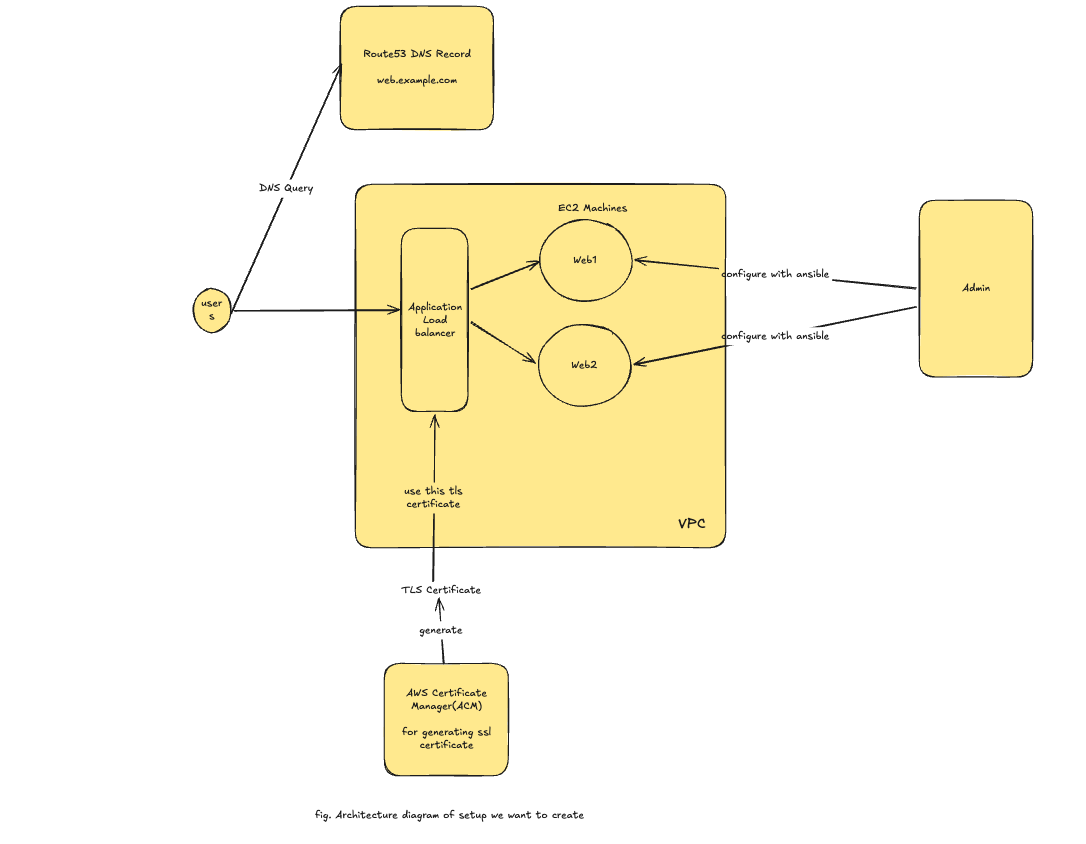
Create these components, in order:
- Route 53 hosted zone — for the subdomain
web.example.com; delegate it by adding its NS records at your existing DNS provider. - ACM certificate — a public TLS certificate for
web.example.com, DNS-validated (same region as the ALB). - Two public EC2 instances — Ubuntu 24.04,
t3.micro, default VPC, two AZs, public IP, key pairgolive, security group allowing 80 and 22. Leave them bare — Ansible configures them in step 6. - Application Load Balancer — internet-facing, across both AZs, with a target group (HTTP :80, health check
/) registering both instances; an HTTPS :443 listener using the ACM cert, and HTTP :80 → 443 redirect. - Route 53 record — an A / alias record
web.example.com → the ALB. - Configure the instances with Ansible — from your control node, run a playbook that installs Docker (e.g. the
geerlingguy.dockerrole) and runs an nginx container port-mapped80:80on each instance, so the ALB's target group health-checks pass and traffic flows.
Done when: https://web.example.com loads with a valid padlock, served through the ALB by the nginx containers on both instances.
🔻 Teardown checklist (important — these cost money)
Delete, in order: ALB → target group → both EC2 instances → security group. Then remove the web.example.com record (and the hosted zone if you're done — it's $0.50/month while it exists). The ACM certificate is free; leave or delete it. Confirm Load Balancers and Instances are empty.
Other important AWS services
This course covers the foundational compute + networking layer. Here are the other services you'll meet constantly in the wild — one line each, with the official docs:
| Service | What it is | Docs |
|---|---|---|
| S3 | Object storage — files in buckets, reached over HTTP; backups, artifacts, static sites | docs |
| RDS | Managed relational databases (Postgres, MySQL) — backups, patching, failover handled for you | docs |
| Lambda | Serverless functions — run code per event, pay per request, no server to manage | docs |
| SQS | Managed message queue — decouple services; one message → one consumer | docs |
| SNS | Pub/sub notifications — one message → many subscribers (email, SMS, Lambda) | docs |
| CloudWatch | Metrics, logs, alarms, dashboards — the observability layer for everything | docs |
| CloudTrail | Audit log of every API call in your account — who did what, when | docs |
| DynamoDB | Managed serverless NoSQL key-value / document database at any scale | docs |
| ECR / ECS / EKS | Container registry, and container orchestration (ECS = AWS-native, EKS = Kubernetes) | ECR · ECS · EKS |
| Secrets Manager | Store and rotate secrets (DB passwords, API keys) instead of hardcoding them | docs |
Advanced Topics
Adjacent to today — read the linked resource for each:
- Private subnets & Session Manager — reach private hosts via a bastion or SSM, with no public IP → AWS — Session Manager
- Auto Scaling Groups — a launch template + ASG behind the target group so capacity self-adjusts and self-heals → AWS — What is EC2 Auto Scaling?
- HTTP→HTTPS redirects on the ALB — redirect listener actions so every request ends up encrypted → AWS — ALB listeners & redirect actions
- Route 53 routing policies — weighted, latency, failover, and geolocation routing → AWS — Choosing a routing policy
Assignment
Deploy site.zip to your Day 3 stack. Extend your Ansible playbook so the nginx container on each instance serves the site.zip from Week 3 · Day 1 (https://github.com/user-attachments/files/30199374/site.zip) on port 80 — the same Docker + nginx pattern as the Day 2 assignment, mapped to host port 80 instead of 8080. When you're done, https://web.example.com should serve your site, load-balanced across both instances behind the ALB.
Submit: the live URL (while it's up), a screenshot showing the padlock + your site, and curl -s https://web.example.com run a few times showing it reaches both instances.
Further Reading
Watch
Reference